Sketches · updated Oct 19, 2026스케치 · 2026년 10월 19일 업데이트

Every design ticket, sketched디자인 티켓 전부, 스케치

All eleven design tickets, each with where its design is now and a sketch to react to. Sections 1–5 are from Oct 17 with an update note; 6–12 are new. Booking in one chat (03D) is still the most valuable work, and sketches are not specs: pick a direction and it goes into Figma.디자인 티켓 열한 개 전부, 지금 디자인이 있는 곳과 반응할 스케치와 함께. 1–5는 10/17 것에 업데이트 메모, 6–12는 새로. 채팅 하나로 예약(03D)이 여전히 가장 가치 있고, 스케치는 스펙이 아니에요: 방향을 고르면 Figma로 가요.

Every ticket, and where its design is티켓마다, 디자인이 있는 곳

Ticket티켓Status상태Where the design is디자인 위치Next다음
#111Sketched스케치Pick the panel direction; Minsik builds SidePanel.web.tsx (10.9). The frame's scale needs room for the panel.패널 방향 선택 → 민식 님이 SidePanel.web.tsx (10.9). 프레임 축소 계산에 패널 폭이 필요해요.
#112All 7 in the app앱에 7개 모두Choose the look, then plugin round 3 makes the Figma frames; attach screenshots and close.룩을 정하면 플러그인 3차가 Figma 프레임을 만들어요. 스크린샷 달고 닫기.
#1134 gaps빈칸 4개Seulgi shoots the cat, the squirrel walk, two dogs and the real handoffs; keep the sample-* test ids.슬기 님이 고양이, 다람쥐 산책, 두 마리, 실제 인계 사진 촬영. sample-* 테스트 id 유지.
#114Drafted · new초안 · 새로Your review, then one PR that swaps the nine PNGs (same names). Your first PR?묵 님 검토 후 PNG 9개를 바꾸는 PR 하나(같은 이름). 첫 PR로?
#115Sketched스케치Decide bars or pentagon for the five axes, then Figma by Oct 22 (code Oct 24).다섯 축을 막대로 할지 오각형으로 할지 정하고, 10/22까지 Figma (코드 10/24).
#116Storyboard · new스토리보드 · 새로Minsik records around Oct 27; edit to under 3 min; public on YouTube before Oct 28.민식 님 녹화 10/27쯤, 3분 안으로 편집, 10/28 전에 YouTube 공개.
#117Closed닫힘Done: #54 merged, #41 and #117 closed.끝: #54 머지, #41과 #117 닫힘.
#118Drafted · new초안 · 새로Later (Mook, Oct 19). Team call: themes come back as a paper the sitter picks (no AI), four tokens each.나중에 (묵 님, 10/19). 팀 결정: AI 없이 시터가 고르는 종이로 테마, 토큰 넷씩.
#119Not a priority우선순위 아님Not a priority (Mook, Oct 19). Still at the workbench stage with 7 open questions.우선순위 아님 (묵 님, 10/19). 아직 워크벤치 단계, 열린 질문 7개.
#120B + D · in reviewB + D · 리뷰 중Picked B + D (Oct 18): next openings, then the month and each day on their own pages. No roll-up. Left: a “Free for your dates” card.B + D 선택 (10/18): 다음 빈 시간, 달과 하루는 각자 페이지로. 말아 올리기 없음. 남은 것: “Free for your dates” 카드.
#147Built · in review만듦 · 리뷰 중Built in #178: menu drawer from the right, bell stays out. Waiting for review.#178로 만듦: 오른쪽 메뉴 서랍, 종은 밖에. 리뷰 대기.
#140 – #146Sketched스케치Not a design ticket, but it's the new demo spine (03D).디자인 티켓은 아니지만 새 데모 뼈대(03D).

1 · Booking in one chat1 · 채팅 하나로 예약

Playable · most important체험 가능 · 가장 중요Play it ▸체험하기 ▸ #140 – #146
Why now왜 지금It's the new spine of the demo video, Minsik starts it after the search follow-ups (#138 – #140), and it has no design yet. Seven card types designed once means seven consistent cards instead of seven guesses.데모 영상의 새 뼈대이고, 민식 님이 검색 후속 작업(#138 – #140) 다음에 시작해요. 아직 디자인이 없어요. 카드 일곱 종류를 한 번에 정하면 일곱 번 추측하지 않아도 돼요.
What I decided정한 것
  • Stepper on top, the same five stages as the Draft's Pages layout (Ask · Meet · Book · Care · Home). A repeat pair shows Meet as skipped.위에 단계 표시, 초안 Pages 레이아웃과 같은 다섯 단계 (Ask · Meet · Book · Care · Home). 재방문 쌍은 Meet을 건너뜀으로.
  • Cards, not bubbles, for anything with a price, date or decision: full width, one tag line, facts, at most one filled button.가격·날짜·결정이 있는 것은 말풍선이 아니라 카드: 전체 폭, 태그 한 줄, 사실, 채운 버튼은 최대 하나.
  • AI chips fill the box, never send: “Draft · edit before sending” (D36).AI 칩은 입력창만 채우고 보내지 않아요: “Draft · edit before sending” (D36).
  • Both must say yes: the agreement card shows two check rows; Pay appears only when both are ticked.둘 다 예: 합의 카드에 체크 두 줄, 둘 다 체크되면 결제 버튼이 나와요.
Questions for you and Minsik묵 님과 민식 님께 질문
  • The app's bar today says Request · Meet & Greet · Confirm · Pay · Stay. Switch to the five README stages, which also cover care and the ride home?지금 앱의 막대는 Request · Meet & Greet · Confirm · Pay · Stay. 돌봄과 귀가까지 포함하는 README 다섯 단계로 바꿀까요?
  • Does the chats list need the stage per thread (the small bar), or just the last message?채팅 목록에 대화마다 단계(작은 막대)가 필요할까요, 마지막 메시지면 될까요?
Update업데이트For #112: these chat cards replace the old inquiry, Meet & Greet and checkout screens on the demo path, so the Figma round should draw the chat, not the old screens.#112용: 이 채팅 카드가 데모 경로의 옛 문의·만남·결제 화면을 대신해요. Figma에는 옛 화면이 아니라 채팅을 그려야 해요.

2 · Calendar without letters2 · 글자 없는 달력

Decided · B + D in #183결정 · #183의 B + D #134 (replaces most of대부분 대체 #120)
Update업데이트Oct 18: #134 shipped in #150 with stacked bands (morning at the bottom, night on top) instead of the thirds sketched here; the new sketches below follow the shipped bands. PR #129 still adds a spelled-out M·A·N key: close it.
Oct 19: #129 merged without the key. For #120 Mook picked B + D from five options: next openings on the profile, the month and each day on their own pages, no roll-up. Built in #183; the roll-up sketches below are no longer the plan.
10/18: #134가 #150에서 여기 3등분 대신 가로 띠(아래 아침, 위 밤)로 출시됐어요. 아래 새 스케치는 출시된 띠를 따라요. PR #129은 아직 M·A·N 설명을 추가해요: 닫기.
10/19: #129는 키 없이 머지됐어요. #120은 묵 님이 다섯 가지 안 중 B + D를 골랐어요: 프로필에 다음 빈 시간, 달과 하루는 각자 페이지, 말아 올리기 없음. #183으로 만들었고, 아래 말아 올리기 스케치는 더 이상 계획이 아니에요.
The original sketches (decided, kept for reference)처음 스케치 (결정됨, 참고용)
Why now왜 지금The sitter detail screen in the chat flow (#140) shows this calendar, and #134 is Minsik's next batch. The ticket is specific; what it needs from design is the hatch itself, today, and a selected range.채팅 흐름의 시터 상세(#140)가 이 달력을 보여 주고, #134는 민식 님의 다음 묶음이에요. 티켓은 구체적이라 디자인이 줄 것은 빗금 자체, 오늘 표시, 선택한 기간이에요.
What I decided정한 것
  • Thirds left to right = morning, afternoon, overnight; no letters anywhere.왼쪽부터 3등분 = 오전, 오후, 밤. 글자는 어디에도 없음.
  • Hatch at 135°, ink at 38 %: visible against white (3 : 1 for the stripes), calm enough for a whole month.135° 빗금, 잉크 38 %: 흰색에서 보이고(줄무늬 3 : 1), 한 달 전체에도 차분해요.
  • Today = small gold dot; selected days = green outline; past days = grey number, no fill.오늘 = 작은 골드 점, 선택한 날 = 초록 테두리, 지난날 = 회색 숫자, 채움 없음.
For you묵 님께
  • #120 can close once #134 lands; only CAL-2 (the roll-up gesture) is left, and I'd move it after the hackathon.#134가 들어가면 #120은 닫아도 돼요. 남은 건 CAL-2 (말아 올리기 제스처)뿐이고, 해커톤 뒤로 미루길 추천해요.

4 · Large-text pet onboarding and “Max at a glance”4 · 큰 글씨 펫 온보딩과 “Max at a glance”

Sketched · needed by Oct 22스케치 · 10/22까지 필요 #115
Why now왜 지금Minsik builds it Oct 24 from your Figma; it's the only design ticket that blocks code. One template covers all 18 questions, so a few frames are enough.민식 님이 10/24에 묵 님 Figma로 만들어요. 코드를 막는 유일한 디자인 티켓이에요. 템플릿 하나가 18문항을 모두 덮으니 몇 프레임이면 돼요.
What I decided정한 것
  • Question 28 px in the logo face, options 20 px in 64 px rows, one question per screen, progress in gold.질문 28px 로고 서체, 선택지 20px · 64px 줄, 한 화면에 질문 하나, 진행은 골드.
  • Four-step bars, not a radar chart, for the five axes: each axis reads on its own, with its word under it. Radar charts are hard to read and to say out loud.다섯 축은 레이더가 아니라 4칸 막대: 축마다 따로 읽히고 아래에 말이 있어요. 레이더는 읽기도, 말로 하기도 어려워요.
  • Safety answers never go into the chart: they're warning Tags at the top of the card.안전 답은 차트에 넣지 않고 카드 위쪽에 warning 태그로.
For you묵 님께
  • Photo and voice stay optional: “Skip” is always the second button. Keep it that visible?사진과 음성은 선택: “Skip”은 늘 두 번째 버튼. 이만큼 보이게 둘까요?
Update업데이트Oct 18 · a decision: the spec (§5) asks for a pentagon with four rings; this sketch uses four-step bars. Bars also need no new library, while the pentagon needs react-native-svg, which isn't in the app. Your call before Oct 22.10/18 · 결정 필요: 스펙(§5)은 링 네 개의 오각형, 이 스케치는 4칸 막대. 막대는 새 라이브러리가 필요 없고, 오각형은 앱에 없는 react-native-svg가 필요해요. 10/22 전에 결정.Oct 20 · playable: the large-text flow and Max at a glance, as S1 (no AI), S2 (photo) and S3 (voice) of one template, with bars and the pentagon one switch apart.10/20 · 눌러 보기: 큰 글씨 흐름과 Max at a glance. 템플릿 하나의 S1(AI 없이), S2(사진), S3(음성), 막대와 오각형은 전환 한 번.

5 · The judges' side panel on desktop5 · 데스크톱의 심사위원용 옆 패널

Sketched · small스케치 · 작음 #111 · 10.9
Why now왜 지금It's the first thing a judge sees on a laptop, and Minsik builds it in Phase 10. The frames themselves are done; the panel is the only open part of #111.심사위원이 노트북에서 처음 보는 화면이고, 민식 님이 Phase 10에서 만들어요. 프레임은 끝났고 패널만 남았어요.
What I decided정한 것
  • One job: get a judge into the demo in one click. Two big buttons (as owner, as sitter), then “Show both phones”.할 일은 하나: 한 번 클릭으로 데모에 들어가기. 큰 버튼 두 개(오너로, 시터로), 그다음 “Show both phones”.
  • The mouse hint as two small pills, the QR for phones, then video and GitHub. Cream backdrop with the gold logo.마우스 힌트는 작은 알약 두 개, 폰용 QR, 그다음 영상과 GitHub. 크림 배경에 골드 로고.
  • Under 1,100 px wide, the panel moves under the phone.폭 1,100px 미만이면 패널이 폰 아래로.
For you묵 님께
  • The panel is marketing, so it can be fully Expressive even if the app keeps today's look. Agree?패널은 마케팅이라 앱이 지금 룩이어도 완전히 익스프레시브여도 돼요. 동의하세요?
Update업데이트Oct 18: SidePanel.web.tsx doesn't exist yet and the frame's scale math uses the whole window, so it needs the panel's width (or the under-1,100 px stacking) before Minsik builds it. Still needed: the pitch line, the QR image, the video and GitHub links.
Oct 20: direction B is playable: judge-panel.html, four “Show me” steps with model chips, a real QR and the under-1,100 px stacking.
10/18: SidePanel.web.tsx는 아직 없고 프레임 축소 계산이 창 전체 폭을 써서, 만들기 전에 패널 폭(또는 1,100px 미만에서 아래로)이 필요해요. 남은 것: 소개 한 줄, QR 이미지, 영상·GitHub 링크.
10/20: B안을 눌러 볼 수 있어요: judge-panel.html, 모델 칩이 있는 “Show me” 네 단계, 진짜 QR, 1,100px 미만 쌓기.
1440 × 900
Home
goldito

Pet sitting where owners learn without asking, and sitters care, snap and tap. Built on NVIDIA Nemotron.

Try the demo as an owner
Try it as a sitter
Click = tapDrag or scroll = swipeShow both phones →
Open on your phone
goldito-petcare.vercel.app
Watch the 3-min videoGitHub ↗

6 · The sticker set, in pixels6 · 픽셀 스티커 세트

Drafted · new초안 · 새로#114
Why now왜 지금Owners decorate the diary in the video, and the placeholders are generic clip art. Same nine names, so it's a file swap: no code.영상에서 오너가 다이어리를 꾸미는데 지금은 일반 클립아트예요. 이름 아홉 개가 같아서 파일만 바꾸면 돼요: 코드 없음.
What I decided정한 것
  • Drawn in the logo's pixel style: the bell's shading, a cocoa outline, a white die-cut edge and a soft shadow, so they read as stickers on any paper.로고의 픽셀 스타일: 종과 같은 음영, 코코아 외곽선, 흰 칼선, 부드러운 그림자. 어떤 종이 위에서도 스티커로 읽혀요.
  • 32 × 32 cells: 256 px (8 px cells) for the app today, and 512 px (16 px cells) for sharp edges at the 2.5× zoom.32 × 32칸: 앱용 256px(8px 칸), 2.5배 확대에도 선명한 512px(16px 칸).
  • Brand colours only; the star and sun get faces, the rest stay quiet.브랜드 색만. 별과 해에만 얼굴, 나머지는 조용히.
For you묵 님께
  • Faces on the star and sun: cute, or too much?별과 해의 얼굴: 귀여운가요, 과한가요?
  • Ship 512 px? It doubles the files (still small) and keeps the edges crisp when a sticker is scaled up.512px로 낼까요? 파일은 두 배(그래도 작아요)지만 키워도 가장자리가 선명해요.
Ball stickerBallball.png
Best day! stickerBest day!best_day.png
Bone stickerBonebone.png
Cloud stickerCloudcloud.png
Heart stickerHeartheart.png
Paw stickerPawpaw.png
Star stickerStarstar.png
Sun stickerSunsun.png
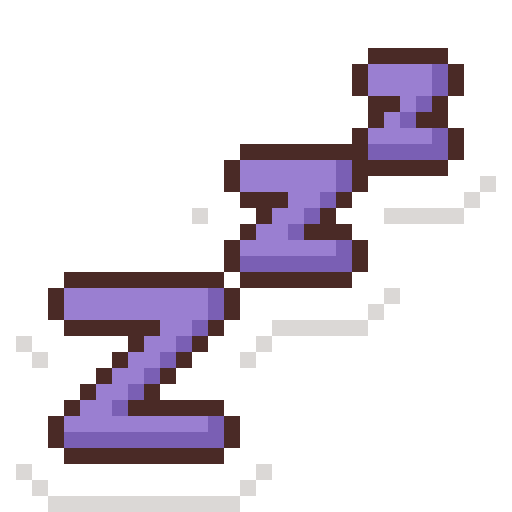
Sleepy stickerSleepyzzz.png
Picker · 48 px선택 · 48px
On the page · 85 px페이지 · 85px
Zoomed · 2.5×확대 · 2.5배
Placeholders today:지금의 임시본:Ball placeholderBest day! placeholderBone placeholderCloud placeholderHeart placeholderPaw placeholderStar placeholderSun placeholderSleepy placeholder

Click a sticker to open it at 512 px. Files: design/concept-prototypes/assets/tickets/stickers/ (256) and stickers-512/; source design/stickers/stickers.py.스티커를 누르면 512px로 열려요. 파일: design/concept-prototypes/assets/tickets/stickers/(256), stickers-512/, 소스 design/stickers/stickers.py.

7 · Four diary papers7 · 다이어리 종이 네 장

Drafted · new초안 · 새로#118 · 11.8
Why now왜 지금The four themes were tied to AI auto-decor, which is on hold, so the diary page is always plain white. As a paper the sitter picks, they're cheap to build and make Save image look like a keepsake.네 테마는 보류된 AI 자동 꾸미기에 묶여 있어서 다이어리는 늘 흰 종이예요. 시터가 고르는 종이로 하면 만들기 쉽고, 이미지 저장이 기념품처럼 보여요.
What I decided정한 것
  • A theme changes only four things: paper, border, accent (top band and picture box) and ink (text and rules, kept ≥ 7 : 1 on the paper). Layout, Gaegu 20 / 30 and stickers stay the same.테마가 바꾸는 건 넷뿐: 종이, 테두리, 강조(위 띠와 사진 칸), 잉크(글자와 줄, 종이 대비 7 : 1 이상). 배치, Gaegu 20 / 30, 스티커는 그대로.
  • The preset sticker set is the same nine (section 6), so #114 and #118 are one job.프리셋 스티커는 같은 9개(6번)라 #114와 #118은 한 작업.
  • Names stay the spec's keys: sunny, cozy, playful, calm.이름은 스펙 키 그대로: sunny, cozy, playful, calm.

For you묵 님께
  • Team call: bring themes back as a hand-picked paper, without the AI?팀 결정: AI 없이 직접 고르는 종이로 테마를 되살릴까요?
  • Default paper: Sunny, or plain white with the themes as options?기본 종이: Sunny, 아니면 흰 종이에 테마는 선택?
Fri, Oct 10Max · day 2
Breakfast in the sun, then the long loop by the park. Max found every puddle.
paper #FFF7DAborder #F1D27Aaccent #FBEFC8ink #5C4300
Sunny · sunnyA bright day out밝은 바깥 날
Fri, Oct 10Max · day 2
Rainy afternoon. Max stole the warm spot on the couch and napped till four.
paper #FBEFE6border #E2C2A8accent #FDE2CCink #5A3324
Cozy · cozyA slow day in느린 실내 날
Fri, Oct 10Max · day 2
Fetch, fetch, fetch. Then a carrot as a reward, which he pretended to like.
paper #EAF7EEborder #9FD3B3accent #D8F3DCink #1B4332
Playful · playfulA busy, happy day바쁘고 신난 날
Fri, Oct 10Max · day 2
Quiet day. Pill at two, hidden in a treat. Slept through the thunder.
paper #EEF3FAborder #B9CCE4accent #DCE8F2ink #22344F
Calm · calmA quiet day, or after a vet visit조용한 날, 또는 병원 다녀온 날

8 · Coat-color skins and the 8-bit status room8 · 털 색 스킨과 8비트 상태 방

Drafted · new초안 · 새로WIP: heads only, bodies and body types in progress작업 중: 머리만, 몸과 체형은 작업 중#119 · 11.10 · 11.12
Why now왜 지금Most of the art exists now: 17 pixel pets with shared faces and outfits are on the Logo files page. This turns them into the two P1 features, so they're ready if there's time.그림 대부분이 이미 있어요: 얼굴과 옷을 공유하는 픽셀 펫 17종이 Logo files 페이지에. 이걸 P1 기능 두 개로 옮겨, 시간이 나면 바로 쓸 수 있게.
What I decided정한 것
  • Seven skins, as the spec names them. Each preset's green-equivalent is darkened until it's ≥ 4.5 : 1 on white; text stays dark and status colours never change.스펙의 스킨 일곱. 각 기본색을 흰색 대비 4.5 : 1 이상이 될 때까지 어둡게. 글자는 어둡게 유지, 상태 색은 안 바뀜.
  • The coat picks the skin (white and grey coats fall back to Umber or Slate); Plum and Rose are only ever the owner's choice.털이 스킨을 골라요(흰색·회색은 Umber나 Slate로). Plum과 Rose는 오너가 고를 때만.
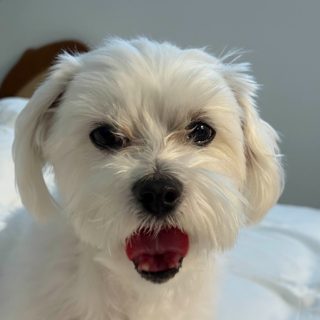
  • The room: Max (Maltese) and Mochi (cat) on a 24-cell grid, 2-frame idle (blink), five states; the skin tints the wall only, never the sprite.방: Max(말티즈)와 Mochi(고양이), 24칸 그리드, 2프레임 대기(깜빡임), 상태 다섯. 스킨은 벽만 물들이고 스프라이트는 그대로.
For you묵 님께
  • Is Mochi the orange tabby, or should the generic cat be the tuxedo?Mochi는 주황 태비? 아니면 일반 고양이는 턱시도?
  • Sprites ship as one PNG strip per state (24 × 24 frames, drawn at 4×). OK for Minsik?스프라이트는 상태마다 PNG 한 줄(24 × 24 프레임, 4배로). 민식 님께 괜찮을지?

Seven skins스킨 일곱

Max
Fed · 8 AM
Message Chloe
ForestDefault for every pet; brand green모든 펫의 기본, 브랜드 그린#35825E · 4.7 : 1
Max
Fed · 8 AM
Message Chloe
AmberGolden, fawn, apricot coats골든, 폰, 살구색 털#956F23 · 4.6 : 1
Max
Fed · 8 AM
Message Chloe
ClayRed, orange and ginger coats레드, 오렌지, 진저 털#B95631 · 4.7 : 1
Max
Fed · 8 AM
Message Chloe
UmberBrown coats, and white or cream (warm fallback)갈색 털, 흰색·크림(따뜻한 대체)#936E53 · 4.6 : 1
Max
Fed · 8 AM
Message Chloe
SlateGrey, black, blue coats (cool fallback)회색, 검정, 블루 털(차가운 대체)#577594 · 4.8 : 1
Max
Fed · 8 AM
Message Chloe
PlumOwner's pick오너 선택#834D9D · 6.0 : 1
Max
Fed · 8 AM
Message Chloe
RoseOwner's pick오너 선택#AE3D50 · 5.9 : 1

The status room on Owner Home오너 홈의 상태 방

States: Max and Mochi상태: Max와 Mochi

Happy신남
Calm평온
Tired피곤
Hungry배고픔
Sleepy졸림
Happy신남
Calm평온
Tired피곤
Hungry배고픔
Sleepy졸림

9 · Scenario screens: a map, not new drawings9 · 시나리오 화면: 새 그림이 아니라 지도

All 7 in the app앱에 7개 모두#112
Why now왜 지금All seven screens on the ticket exist in the app, and the Figma plugin already builds them. What's missing is Figma frames that match today's app, in the look we pick.티켓의 일곱 화면은 모두 앱에 있고, Figma 플러그인도 이미 만들어요. 없는 건 지금 앱과 맞는, 고른 룩의 Figma 프레임이에요.
What I decided정한 것
  • Four of the seven now live inside the booking chat (03D): draw those as chat cards (section 1), not as the old screens.일곱 중 넷은 이제 예약 채팅(03D) 안: 옛 화면이 아니라 채팅 카드(1번)로.
  • Trip, the 5-second check and the album haven't changed: the plugin's frames are right; restyle only if the look changes.이동, 5초 체크, 앨범은 그대로: 플러그인 프레임이 맞고, 룩이 바뀔 때만 다시.
  • The tab bar says Snap in code and Mood in Figma: fix the Figma tab (D61).탭바가 코드는 Snap, Figma는 Mood: Figma 탭 수정 (D61).
For you묵 님께
  • Which look do the frames use: Expressive (the sketches) or the app's look today?프레임은 어느 룩으로: 익스프레시브(스케치) 아니면 지금 앱 룩?
Screen화면In the app앱Draw it as그릴 것
Inquiry thread + quote card문의 대화 + 견적 카드[inquiryId].tsx · QuoteCard.tsxIn the chat now (cards 1–2)이제 채팅 안 (카드 1–2)
Care request → checklist돌봄 요청 → 체크리스트care-request.tsx · ChecklistCardChat card채팅 카드
Meet & Greet card + sheet만남 카드 + 시트MeetGreetCard.tsx · MeetGreetSheet.tsxChat card (#144)채팅 카드 (#144)
Checkout + entry-info lock결제 + 출입 정보 잠금checkout.tsx · EntryInfoCard.tsxChat card, then checkout채팅 카드 → 결제
Trip: map, ETA, arrival이동: 지도, 도착 예정, 도착TripScreen.tsx · TripMap.web.tsxPlugin frame (unchanged)플러그인 프레임 (그대로)
5-second check + AI chips5초 체크 + AI 칩ReportComposer.tsx · ChipSuggestions.tsxPlugin frame (unchanged)플러그인 프레임 (그대로)
Album · review · Life Record앨범 · 리뷰 · Life RecordAlbumView.tsx · LifeRecordCard.tsxPlugin frames (unchanged)플러그인 프레임 (그대로)

10 · Sample photos: what's there and what's missing10 · 샘플 사진: 있는 것과 없는 것

4 gaps빈칸 4개#113 · 4.7
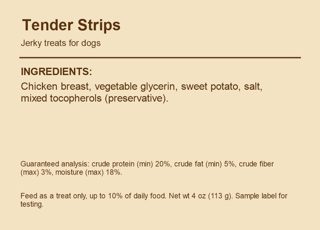
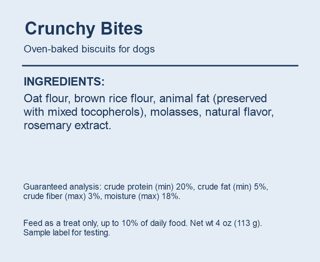
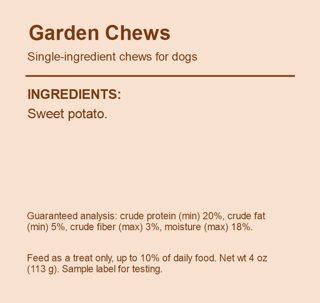
Why now왜 지금The daily photos and the four treat labels are in the app. Mochi has no photo at all, and the handoff set is still four grey placeholders.일상 사진과 간식 라벨 넷은 앱에 있어요. Mochi 사진은 하나도 없고, 인계 사진은 아직 회색 임시본 넷이에요.
What I decided정한 것
  • Real photos, not drawings: the AI reads them (captions, the photo check), so this is Seulgi's shoot, with a shot list from design.그림이 아니라 실제 사진: AI가 읽어요(캡션, 사진 검사). 디자인이 촬영 목록을 주고 슬기 님이 촬영.
  • Square-safe framing: the pet in the middle third, eye level, daylight, a plain floor. No people, plates, addresses or real brands.정사각형으로 잘려도 되게: 펫은 가운데, 눈높이, 낮 빛, 단순한 바닥. 사람, 접시, 주소, 실제 브랜드 없음.
  • Keep the file names and the test ids sample-meal, sample-walk, sample-nap.파일 이름과 테스트 id sample-meal, sample-walk, sample-nap 유지.
For you묵 님께
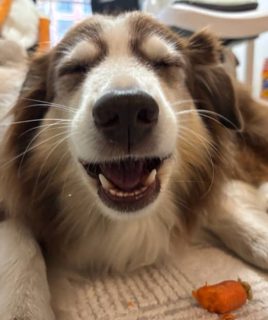
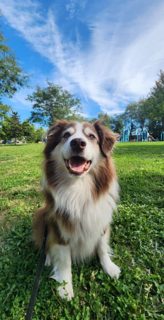
  • walk_squirrel was dropped on Oct 4. Bring it back? The daily note's best moment in the old script came from it.walk_squirrel은 10/4에 빠졌어요. 되살릴까요? 옛 대본의 알림장 명장면이 이 사진에서 나왔어요.
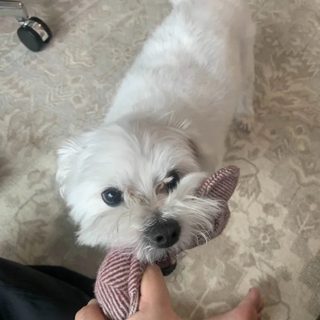
  • maltese_tug_toy shows part of a hand; swap it for “no people”?maltese_tug_toy에 손이 일부 보여요. “사람 없음”에 맞게 바꿀까요?

Missing: the shot list없는 것: 촬영 목록

Mochi eating, bowl from aboveMochi 식사, 위에서 본 그릇
mochi_meal.jpg
Mochi at a window (a cat's walk)창가의 Mochi (고양이 산책)
mochi_window.jpg
Mochi asleep, curled up웅크려 자는 Mochi
mochi_nap.jpg
A dog watching a squirrel in a park공원에서 다람쥐를 보는 개
walk_squirrel.jpg
Two dogs in one photo한 사진에 개 두 마리
two_dogs.jpg
Two 5-second clips5초 영상 두 개
clip_1.mp4 · clip_2.mp4
Real: the pet at the door실제: 문 앞의 펫
dog_at_door.jpg
Real: car, crate buckled in실제: 차, 켄넬 고정
car_crate_ok.jpg

In the app today지금 앱에 있는 것

mealmeal · sample-meal
walkwalk · sample-walk
napnap · sample-nap
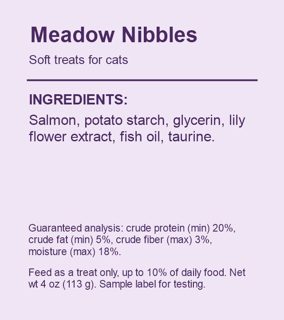
chicken_jerkychicken_jerky · DANGER
animal_fat_biscuitanimal_fat_biscuit · WARNING
sweet_potato_chewsweet_potato_chew · SAFE
lily_scented_cat_treatlily_scented_cat_treat · DANGER
dog_at_doordog_at_door · placeholder
car_crate_okcar_crate_ok · placeholder
car_no_cratecar_no_crate · placeholder
empty_roomempty_room · placeholder
maltese_grass_leashmaltese_grass_leash
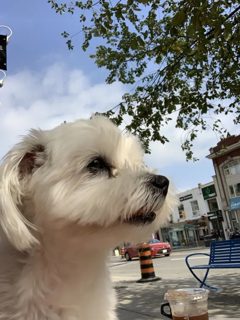
maltese_cafe_streetmaltese_cafe_street
maltese_tug_toymaltese_tug_toy
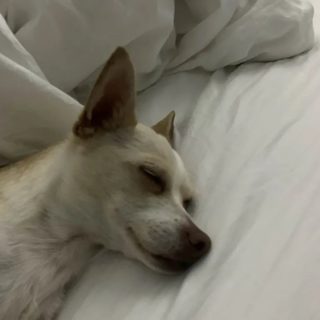
chihuahua_sleeping_bedchihuahua_sleeping_bed
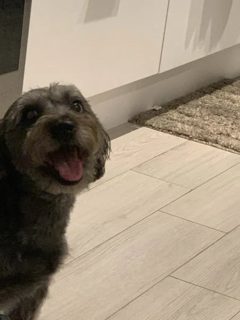
terrier_tongue_out_kitchenterrier_tongue_out_kitchen
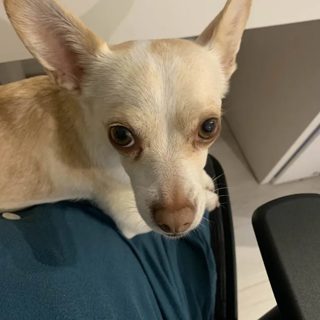
chihuahua_lap_curiouschihuahua_lap_curious

11 · The 3-minute video, as a storyboard11 · 3분 영상 스토리보드

Storyboard · new스토리보드 · 새로#116
Update업데이트Oct 21: replaced by the chat-era shot list with story cards: video.html.10/21: 채팅 흐름 기준 장면 목록과 스토리 카드로 바뀌었어요: video.html.
Why now왜 지금Minsik records around Oct 27 and it must be public before Oct 28, so the cut is decided now and the edit is just assembly. The rules ask the audio to explain Token Factory and the NVIDIA model.민식 님이 10/27쯤 녹화하고 10/28 전에 공개해야 해서, 구성을 지금 정하면 편집은 조립만 남아요. 규칙상 음성이 Token Factory와 NVIDIA 모델을 설명해야 해요.
What I decided정한 것
  • Follows A Stay with Goldito: the five stages, with Care getting the most time because it's the product.A Stay with Goldito를 따라 다섯 단계. 돌봄이 제품이라 가장 길게.
  • Every model named once, where it does visible work: Nemotron drafts, MiniCPM-V reads the label, Qwen3 remembers.모델은 눈에 보이는 일을 할 때 한 번씩: Nemotron 초안, MiniCPM-V 라벨 읽기, Qwen3 기억.
  • No music with a copyright; voice and UI sounds only, or a CC0 track. Captions burned in.저작권 있는 음악 없음. 목소리와 UI 소리만, 또는 CC0 음원. 자막 포함.
For you묵 님께
  • Who voices it: you, Minsik, or a synthetic voice?목소리는 누가: 묵 님, 민식 님, 합성 음성?
  • Show the owner and sitter phones side by side (split view) for the handoff moments?인계 장면에서 오너·시터 폰을 나란히(split view) 보여 줄까요?
Open오프닝0:00 · 12s
Side panel on a laptop → click “Try as owner”. Title: Max and Mochi, Thanksgiving weekend.노트북의 옆 패널 → “Try as owner” 클릭. 제목: Max와 Mochi, 추수감사절 주말.“Robert has never met Chloe. He's leaving two pets with her for four days.”
① Inquiry① 문의0:12 · 33s
Robert asks about Oct 9–12 in the chat. “Chloe is typing…” → the AI reply with the quote card.로버트가 채팅으로 10/9–12를 물어요. “Chloe is typing…” → AI 답장과 견적 카드.“Nemotron on Nebius Token Factory drafts Chloe's reply in her own style. The price comes from the server, never the model.”Token Factory · Nemotron
② Meet & Greet② 만남0:45 · 30s
Care note → checklist and Heads-up cards; Chloe taps “Yes, let's meet”; the Meet card.돌봄 메모 → 체크리스트와 Heads-up 카드, 클로이가 “Yes, let's meet”, Meet 카드.“One line from Robert becomes a timed checklist. Nobody types the same thing twice.”Nemotron
③ Booking③ 예약1:15 · 20s
Both say yes → consents → Pay (demo) → address and packing list unlock.둘 다 예 → 동의서 → 결제(데모) → 주소와 준비물 열림.
④ Care④ 돌봄1:35 · 50s
Live trip and ETA → Received → 5-second check → photos sort themselves → Treat check says DANGER (chicken) → the daily note.실시간 이동과 도착 예정 → 받음 → 5초 체크 → 사진 자동 분류 → 간식 검사 DANGER(닭고기) → 알림장.“Chloe never writes a report. Five seconds of taps and a few photos, and Robert learns everything without asking. MiniCPM-V reads the treat label.”MiniCPM-V · Nemotron
⑤ Home⑤ 귀가2:25 · 25s
“Max and Mochi are home safe” → review → the Life Record.“Max and Mochi are home safe” → 리뷰 → Life Record.“The stay becomes Max's Life Record, so the next sitter already knows him. Qwen3 embeddings on Token Factory power that memory.”Qwen3 Embedding
Close마무리2:50 · 10s
Logo, URL, “Built with NVIDIA Nemotron on Nebius Token Factory.”로고, URL, “Built with NVIDIA Nemotron on Nebius Token Factory.”“Goldito. Learn without asking; care, snap and tap.”

12 · Wrapping up the design PRs12 · 디자인 PR 마무리

Done끝#117
The original sketches (decided, kept for reference)처음 스케치 (결정됨, 참고용)
#54Merged Oct 1610/16 머지

Design system v1, the design site and the Figma plugin. Done; nothing to do.디자인 시스템 v1, 디자인 사이트, Figma 플러그인. 끝, 할 일 없음.

#41Closed닫힘

Primitives and motion, Oct 3. Closed, and #117 with it. Its Log out move is now in the #147 header (#178).프리미티브와 모션, 10/3. 닫혔고 #117도 함께 닫혔어요. 로그아웃 이동은 이제 #147 헤더(#178)에.

Closing comment (English, for GitHub)닫는 코멘트 (GitHub용 영어)
Closing this in favour of what's on main now. - The motion and touch-target tokens landed another way (DESIGN.md §3, tokens.ts). - Moving Log out into Profile is now part of #147, with the header redesign. - PressableScale, Stack, Field, AppearIn and the Button loading state aren't on main; I'll re-propose them as a small PR after the hackathon if we still want them. Rebasing 34 files onto main two weeks before the freeze isn't worth the risk for the demo.